

Return your own warehouse parcel to a seller in China: parcel details, warehouse shipping, courier pickup code, fees, request progress and the separate refund process.

Illustration of the process.
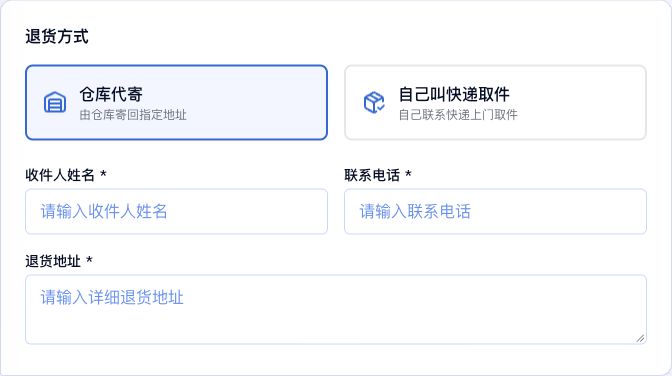
Actual HuaBang Chinese interface showing the return method fields. First enter from your own parcel details and verify the parcel.
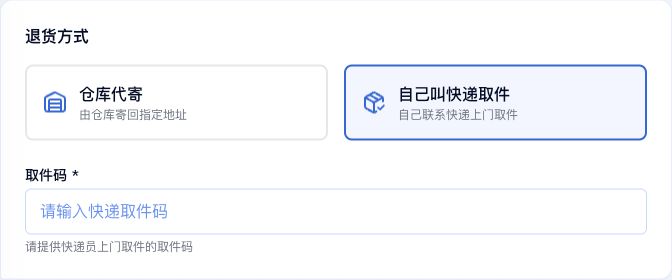
Actual HuaBang Chinese interface showing the return method fields. First enter from your own parcel details and verify the parcel.
If your goods have reached a HuaBang Express warehouse and you need to return them to a seller in China, agree on the return with the seller first. Start the warehouse request from your own parcel details. The warehouse return request and the shopping platform's refund process are handled separately.
1. Prepare the seller's return details
Confirm acceptance, the return deadline, recipient name, phone number and full address in China. Prepare your domestic tracking number or warehouse barcode and sign in to the account that owns the parcel. Contact online support first if you want to return only some items from a parcel.
2. Open your own parcel
Open Warehouse Parcels, locate your parcel using its domestic tracking number or warehouse barcode, then open the details. Check the warehouse and goods. Use the return or exchange action when it is available for that parcel. If the action is missing, or a forwarding order already includes the parcel, ask support whether it can still be changed.
In the application, check the parcel information and choose Return. The reason field is optional in the current form, but a clear description of the issue and warehouse instructions is recommended. If a blank application keeps loading parcel information, go back to your parcel details and enter from there; do not submit without the correct parcel.
3. Let the warehouse send the return
Choose the warehouse shipping option. Enter the seller's confirmed recipient name, phone number and complete return address in China. Do not use your overseas delivery address. Confirm postage, handling and packing arrangements with support and review the request details.
4. Arrange your own courier collection
If the seller, shopping platform or courier has arranged pickup, choose the option for your own courier collection. Enter the pickup code for that appointment. Verify the correct HuaBang warehouse address and the collection arrangements. The warehouse barcode and original domestic tracking number do not replace the new pickup code. Ask support before proceeding if no pickup code was provided.
5. Review and submit
Check the parcel, request type, return method and required details, then submit. If submission is unavailable, verify that parcel information loaded and that the recipient details or pickup code are complete. Review an existing open request instead of creating a duplicate.
6. Follow the request and the refund separately
Open Returns and Exchanges to check review, payment and processing progress. When payment is due, review the amount and fee details before paying. Confirm the outcome using the request status and payment record. Respond promptly to requests for information.
Submitting a request does not prove courier collection, delivery back to the seller or a refund. Once the goods are actually returned, update the return tracking number on the shopping platform as required and follow its refund decision.
Common questions
No parcel or return action? Check the owning account, parcel number, warehouse status and whether a forwarding order already includes it. Give official support the parcel reference privately.
What is required? Warehouse shipping requires the recipient's name, phone and full address. Your own courier collection requires the appointment's pickup code. A reason is recommended even though the current field is optional.
What will it cost and how long will it take? Ask support to confirm the actual parcel, address, method and warehouse arrangements. Use the current request details.
Will the shopping platform automatically refund me? Follow the seller's after-sales process separately, provide the actual return tracking information and wait for the platform's review.
Related Articles

Complete Package Forwarding Guide: From China Warehouse Address to Delivery
October 19, 2026
How to Create or Join a Shipping Group on HuaBang Express: Illustrated Guide
October 19, 2026
Common Items Requiring Shipping Review: HuaBang Express FAQ and Checklist
October 19, 2026
How to Check Shipping Rates and Track Your Parcel: A HuaBang Express Step-by-Step Guide
October 19, 2026